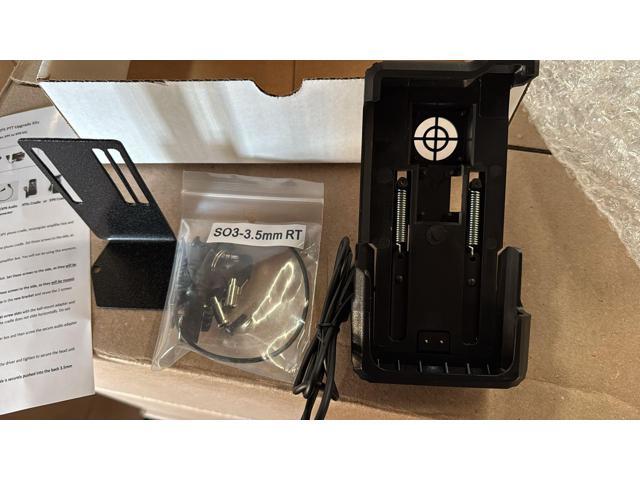
Remove the 2 screws and nuts connecting the speaker to the bracket. Set these screws to the side, as they will be reused. Reuse the 2 screws set to the side to reconnect the rectangular amplifier box to the new bracket and reuse the 2 screws set to the side to reconnect the speaker to the new bracket. Important: Line up the new XP5s or XP8 cradle to the left side of the bracket screw slots with the ball mount adapter and the 4 new screws that are included in the upgrade kit. Tighten screws so that the cradle does not slide horizontally. Do not overtighten screws. Plug in the new Audio cable with the 3.5mm end into the rear of the amplifier box and then screw the secure audio adapter cable end onto the upper right side of the phone. Place the phone into the cradle. Re-attach the ball mount to the existing mounting post to best position for the driver and tighten to secure the head unit in place. Do not overtighten. Make sure all connections are tight and secure and notably that the
GPS Lockbox Sonim XP5 to XP8 Vehicle Upgrade Kit Black
Similar products

9 Band Radio With Bluetooth

Dual Compact LED Gaming Speakers

13.3" Portable Digital TV with 12V DC Car Adapter and Rechargeable Battery

Cubitt VIVA Pro Smartwatch / Fitness Tracker with 1.78" Touch AMOLED Screen

Drum Microphone Kit 9Pc All Metal Drummer Mics Tom/Snare & Cymbals Wired Instrument Drums Set
